

Adding and approving people
Add people to a circle, see what each one is still waiting for, and approve them so they can start, including adding many at once from a list.
A person is not in a circle just because you typed their name. They join when four things are true: an officer has approved them, they have a phone number, they have accepted the rules, and any guarantor the circle requires is recorded. The Members tab shows what each person is still waiting for, so you always know what is holding someone up.
Before you start
- You need the manage permission.
- Set the circle's rules first. Each person accepts the version in force when they join.
- Your Ajo tier has a limit on active contributors. Approving someone past it is refused, with a link to a bigger tier. See Plans, billing and limits.
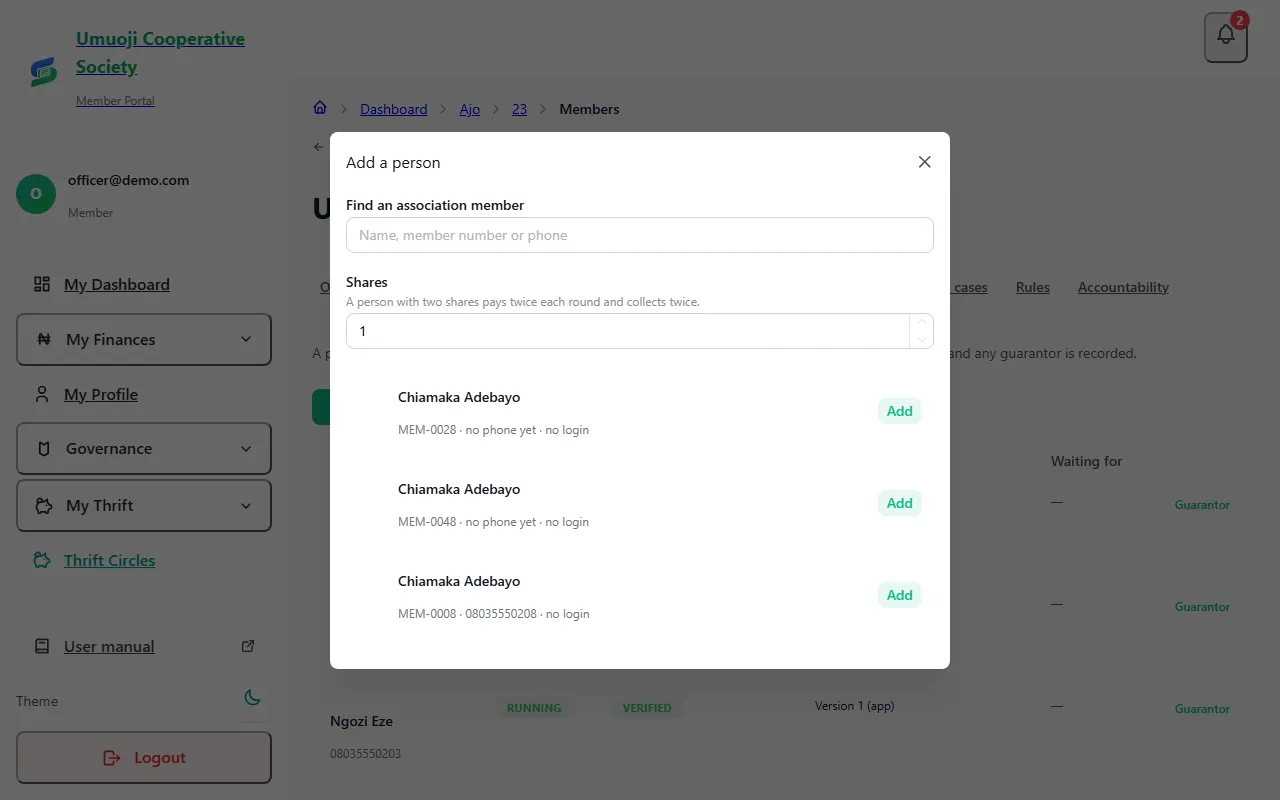
- Someone must already be a member of your association (or your thrift group's member list) before you can add them to a circle. Add new people under Members first.
Add one person
See what each person is waiting for
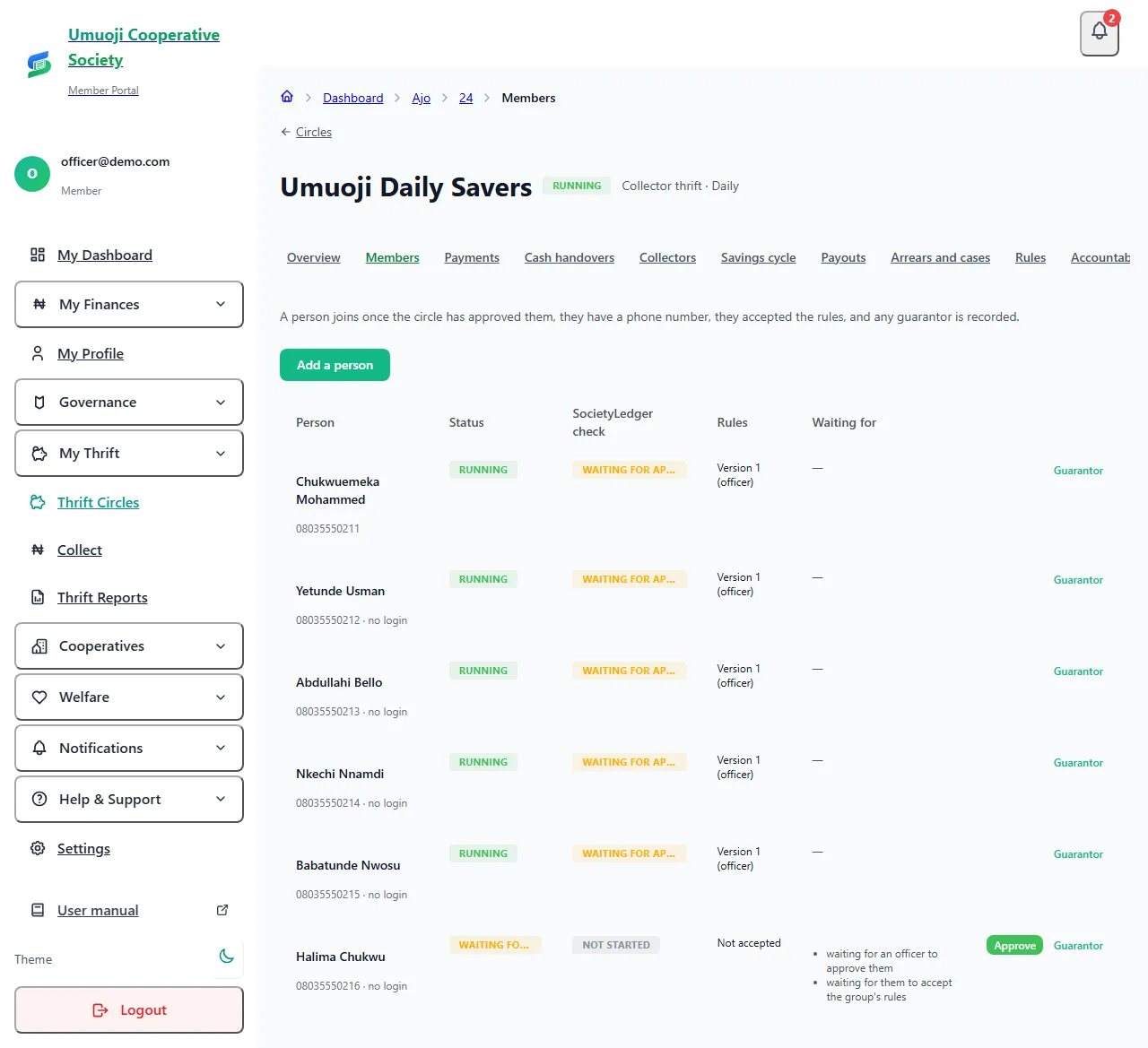
Each row shows the person's Status, their SocietyLedger check (see below), which version of the rules they accepted (and whether they accepted it themselves or an officer recorded it), and Waiting for, a plain list of what is still missing. For example:
- waiting for an officer to approve them
- waiting for them to accept the group's rules
- waiting for their phone number to be confirmed (if the circle asks everyone to confirm their phone)
- waiting for a guarantor (if the circle requires one)
When the last item is done, the person's status changes to Running by itself.
Approve a person
Nobody can approve their own membership. If you added yourself as a contributor, another officer has to approve you. This is deliberate: it is the first of several places where one person cannot be the only one to say yes.
Rules, phone and the SocietyLedger check
- Rules. The person accepts the circle's rules themselves after signing in (see Joining and accepting the rules). If someone has no login, you can record that you explained the rules and they agreed, and your name is recorded against it. The row shows (officer) instead of (app).
- Phone. A circle can ask everyone to confirm their phone with a code that is texted to them. Leave it off if your people do not use SMS.
- SocietyLedger check. Approving a person also asks SocietyLedger to check them, so they can be paid out later. It checks that their name matches their account name, that their phone is confirmed and that their address is filled in. A person without a verified account is never paid. See Your payout account and verification.
- Home address is optional at first, but is needed before a person can be paid out.
Record that someone accepted the rules in person
Some people will not use the app, or agree at a meeting. A person stays Pending until they accept the circle's rules, and the Members list shows "waiting for them to accept the group's rules". If you manage the circle you can record it for them:
- On the Members page, find the person and select Record rules acceptance (on the phone: the same button on their row).
- Read the version shown, which is the one in force now.
- Tick I read these rules to [name] and they agreed to them, and under How it was given write a short note, for example "read aloud at the 14 Nov meeting".
- Select Record acceptance.
It is recorded with your name and the note, and the roster shows the rules as accepted by an officer. The person becomes active once everything else they were waiting for is done. A person who uses the app can accept for themselves instead: My Thrift, the circle, Read and accept the rules.
Add many people at once
When you set up a thrift group (or add a batch), you can upload a list instead of adding people one by one.
If the list has more people than your tier has room for, SocietyLedger refuses the whole list and says so: remove some people, untick approval, or move to a bigger tier. It never adds some of the people and not the rest.
What happens next
When the roster is final and everyone is Running, a rotating pot is ready for the draw. A person who has been added but cannot be approved (for example, the plan limit) stays on the list as waiting, and nothing is lost.
People who leave
A person who leaves stops counting towards your tier's limit, but what they owed and what they were paid stays in the record. Nothing is erased.
Related
Starting a circle
What must be true before a circle can start, what each refusal means (people waiting, start date passed, draw out of date), and how to fix it.
Guarantors
Record a guarantor's agreement for a member, in person or by sending them a link, and understand what a guarantor is and is not.
Rules, grace and late fees
Set a circle's rules: grace days, late fee, guarantors, what happens if someone stops paying, and what members can see. And how to change them fairly.
Last updated 31 October 2026
Rules, grace and late fees
Set a circle's rules: grace days, late fee, guarantors, what happens if someone stops paying, and what members can see. And how to change them fairly.
Starting a circle
What must be true before a circle can start, what each refusal means (people waiting, start date passed, draw out of date), and how to fix it.