

Reports and exports
The eight Ajo reports: what each one counts, which tier includes it, and how to filter, read and download them as CSV or PDF.
Ajo has eight reports. Each one is worked out from the circle's ledger and schedule, the same way on the web, on the phone and in every file, so a figure never differs between them. This page covers what each report counts and how to read and download it.
Before you start
- You need the Ajo reports permission. Officers have it. A collector who has it sees only their own people and their own cash.
- Which reports you can open depends on your Ajo tier. Basic reports come with every tier. A report your tier does not include is still listed, with the reason, so you know what an upgrade would add. See Plans, billing and limits.
The eight reports
| Report | What it shows | Tier |
|---|---|---|
| Contributions | What was expected, paid, outstanding, overdue or missed, one row for each instalment. | Basic |
| Member ledger | Every payment, fee, payout, reversal and adjustment for each person, with a running balance. | Basic |
| Payouts | Scheduled, waiting, paid and reversed payouts, with their beneficiaries. | Basic |
| Group financial summary | Money in, money out, what is owed and the cash counted, by circle and month. | Basic |
| Collector performance | Cash each collector recorded, handed in and had counted, against their targets. | Advanced |
| Defaults and arrears | Who is behind, their unpaid late fees, default cases, repayment plans and disputes. | Advanced |
| Fees and revenue | Late fees assessed, paid and waived, the collector fee, and the platform levy. | Advanced |
| Audit and activity | Approvals, reversals, waivers and rule and order changes, with who, when and why. | Audit |
Open and read a report
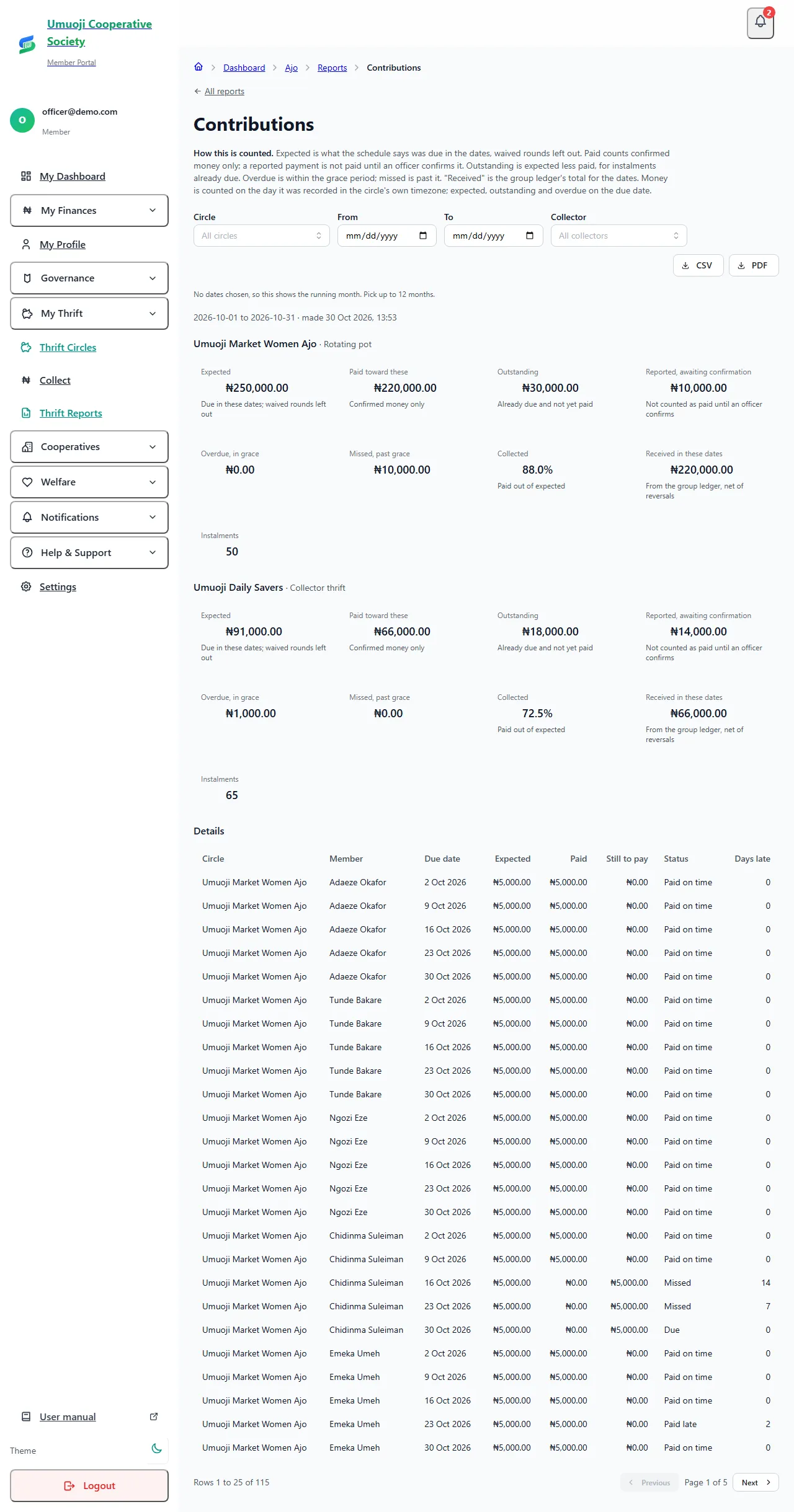
Under every report's title is How this is counted. It says what the figures include, which date each is counted on, and what is left out. Read it the first time you open a report.
What the figures mean
- Only confirmed money is received. A payment that is only reported is shown separately as Reported, awaiting confirmation. It is never added to what was received.
- Money is counted on the day it was recorded, in the circle's own timezone. A payment recorded at 23:30 Lagos time on 31 March is a March payment, even if it is April somewhere else.
- Expected, outstanding and overdue are counted on the due date.
- Circles are never blended. With more than one circle, you get a block of figures for each. Circles of the same kind (two rotating pots, say) also get a total. A rotating pot and a collector-thrift group are never added together, because their money works differently.
- A dash is not a zero. A figure that does not apply shows "—".
- The totals match the ledger. Contributions, payouts and the balance in a report equal the group ledger's totals for the same dates, to the kobo.
Download a report
Choose CSV or PDF at the top right of the report. The file uses the same filters you chose. CSV opens in Excel and in Google Sheets: money is a plain number under a "(₦)" heading, so a column adds up, and phone numbers keep their leading zero. The PDF writes money as "NGN 5,000.00".
A report can have up to 100,000 rows to view or as a CSV, and up to 5,000 rows as a PDF. If it has more, SocietyLedger says so and tells you what to do: choose fewer dates or one circle, or download the CSV instead of the PDF.
What happens next
Each file you download is recorded in the audit log: who made it, which report, which dates and which filters. The Audit and activity report lists these, so the circle can see who took a copy of what.
What is left out, on purpose
Reports show names, and phone numbers for people who are behind, so you can chase them. They never show a bank account number, an email address, a home address, a proof file, a guarantor's details, or a private note.
If your tier changes
If your Ajo add-on expires, the circle becomes read-only and you can still open and download the reports your tier included. Reports from a higher tier stay locked until you renew with a tier that includes them.
Related
Payment statuses
What Paid on time, Reported, Overdue, Missed and the other words mean in a circle, who decides them, and what counts as paid.
Cash reconciliation
How cash a collector takes in becomes confirmed money: recorded, handed over, counted, then confirmed, and what happens when the count is short.
Plans, billing and limits
The Ajo tiers, what each includes, how the contributor limit works, the platform levy, and what happens when your Ajo add-on ends.
Last updated 30 October 2026
Handovers and counting cash
Count the cash a collector hands over, tick the payments that were really in it, and confirm them, including what to do when the count is short.
Officer accountability
See who prepared, approved and recorded every payout, how long payments wait to be confirmed, cash by collector and day, and every exception with its reason.