

The payout order and the draw
How a rotating pot decides who is paid when: the recorded draw, shares, swapping places, and emergency changes with a reason.
In a rotating pot, the order in which people are paid is the most sensitive decision in the circle. SocietyLedger makes it by a recorded random draw, so nobody, including the admin, can arrange it, and everyone can see afterwards that it was fair. This page covers the draw, swapping places, and what to do in an emergency.
Before you start
- This page is for rotating pots. A collector-thrift circle has no order, because everyone is paid at the end of the cycle.
- You need the manage permission to draw and to request swaps. An admin (the approve payouts permission) approves swaps and makes emergency changes.
- Everyone in the circle must be added and approved first. See Adding and approving people.
Two ways to decide the order
A rotating pot decides its payout order one of two ways. You choose when you create the circle, or in Edit settings while the circle is still being set up (it is fixed once the circle starts):
- Automatic draw (the default): a random draw, recorded with its seed. It is described below.
- Admin sets the order: the admin places every person (every share) in order by hand and writes the reason. Some groups prefer this, for example when the order was agreed at a meeting by need.
Members see which one the circle uses on the rules screen where they accept the rules, so nobody is surprised.
Set the order yourself (admin)
If the circle's order is set by the admin, open Payout order (on the phone: Manage, Thrift, the circle, Payout order). Only someone who can approve payouts can do this.
- Move each person up or down until the list is in the order they will be paid. First is paid first. A person with two shares appears twice.
- Under Reason or basis for this order, write why, for example "agreed at the 12 Nov meeting: by need, then date joined". Every member can read it.
- Select Save the order.
Every member is told. The order is recorded as set by you, with the reason, and every version is kept. You can set it again while the circle is still open. If people join, leave or are approved afterwards, the order is out of date and has to be set again before the circle can start. After the circle starts, swaps and emergency changes work as they do for a draw.
Because nothing random backs an order set by hand, there is no seed. The reason is what the group reads. Approve everyone first, then set the order once.
Make the draw
The draw is made while the circle is open for joining, before it starts.
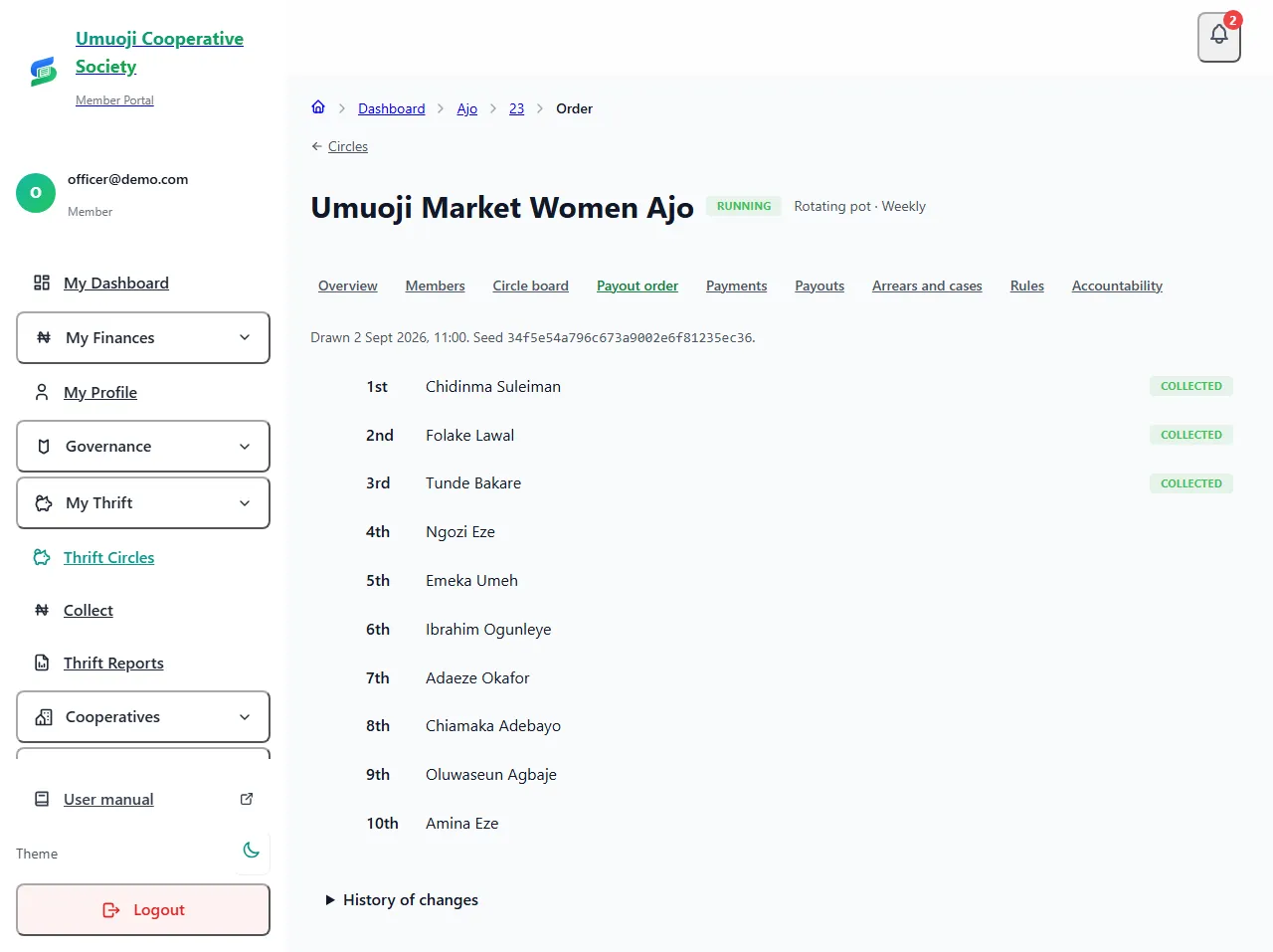
A few things to know:
- You cannot re-roll. If you ask for the draw again, SocietyLedger refuses unless the list of people or their shares has changed since the last draw. This stops anyone redrawing until they like the result.
- You cannot choose a seed. The server makes it. The same seed always gives the same order, so the draw can be checked.
- Shares. A person with two shares has two places in the order, and takes two rounds. They pay the contribution for each share every round.
- Optional rule. The circle can keep people whose trust score is At risk out of the first payout places. It is applied when the draw is made.
Swap two places
Before any payout has been prepared, two people can swap places by agreement.
Swaps are allowed until the first payout is prepared. Once a round's payout has been prepared, approved or paid, that place is held still and cannot be swapped or moved.
An emergency change
Sometimes the person due next cannot be paid: they are ill, or away, or in need of a later turn. After the first payout has been recorded as paid, an admin can move one person who has not yet been paid to a different place, with a written reason.
Only places that have not been paid, and have no payout in progress, can move. Before the first payout is recorded, use an ordinary swap or draw again instead.
What members see, and how to check a draw
Every member of the pot sees a Payout order section on their own circle page (web: My Thrift, the circle; phone: Thrift, the circle), whether or not the Circle board is on. It shows who collects when, with the member's own place marked, and how the order was decided:
- For an automatic draw: when it was drawn, by whom, and the seed. Select Verify this draw and SocietyLedger runs the draw again from the seed and tells you whether it gives exactly the same order. If it does not match, it says so.
- For an order set by the admin: who set it, when, and the reason, with a note that there is no seed because it was set by hand.
This is how a group can see for itself that the order was not quietly changed.
If the people change after the draw
A draw is made for the people in the circle at that moment. If someone is approved, joins, leaves or changes their shares afterwards, the draw is out of date: Payout order says so ("1 person was approved since the draw") and Start the circle refuses until you draw again. This is deliberate, so that an order made for a different circle is never used.
- Open Payout order (on the phone: Manage, Thrift, the circle, Payout order).
- Read the notice, then select Draw again. The old draw stays on the record with its seed, and every member is told about the new one.
- Start the circle.
You can only draw again when the people have changed. A draw for the same people cannot be repeated, so nobody can keep drawing until they like the result.
Draw once, after everyone is approved. If you draw while people are still waiting for approval, SocietyLedger warns you first, because those people are not in that draw and approving them afterwards makes it out of date.
What happens next
Every draw, swap and emergency change is kept under History of changes at the bottom of the page, with who made it and, for emergencies, the reason. They also appear on the accountability page, and members of the circle see the order itself on their Circle board.
Why a swap needs an admin
A swap changes when someone gets money. Asking an admin to approve it means two people agree to every change, and the reason is on record if anyone asks later.
Related
Starting a circle
What must be true before a circle can start, what each refusal means (people waiting, start date passed, draw out of date), and how to fix it.
Preparing, approving and recording a payout
How a payout is worked out, approved by a second person, paid from the circle's own account and recorded, and what to do if the transfer fails.
Adding and approving people
Add people to a circle, see what each one is still waiting for, and approve them so they can start, including adding many at once from a list.
Last updated 31 October 2026