

Joining a circle and accepting the rules
What to do when a circle adds you: read and accept the rules, confirm your phone if asked, and see what you are waiting for.
When a circle's officers add you, the circle appears in My Thrift. You do not need to do anything to be added, but you do need to read and accept the circle's rules before you can start. The rules are the agreement between you and everyone else in the circle: how much you pay, when, how long you have after the due date, and what happens if someone falls behind.
Before you start
- You need a SocietyLedger login. If an officer added you without one, they may have emailed you a link, or they can record on your behalf that they explained the rules and you agreed.
- Make sure the circle has your correct phone number. It is where you will get texts about your payments.
Accept the rules
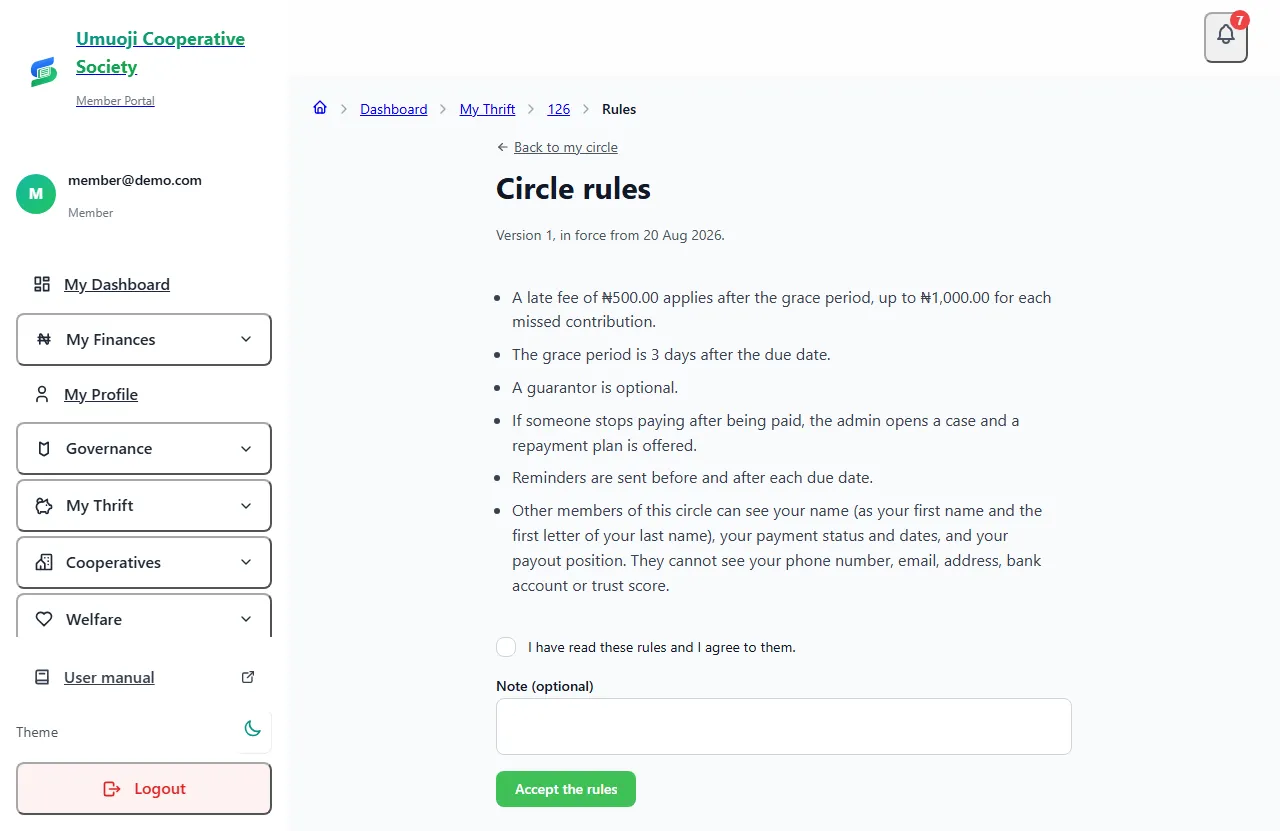
If the circle asks you to confirm your phone
Some circles ask everyone to confirm their phone number. You will see a card called Confirm your phone number: "We text a code to the number on file."
The code stays valid for a short time. Never share it with anyone. An officer or a collector never needs it. If it expires, ask for another.
What you are waiting for
Until you are Running, your circle page says "Before you can start, the circle is waiting for:" and lists what is outstanding. It could be that an officer still has to approve you, that you have to accept the rules, confirm your phone, or that a guarantor has to be recorded.
When everything is done, you become Running by yourself, and you can see your schedule and start paying.
What happens next
- Your schedule appears. It shows each payment, its amount and its due date.
- Your payout account. Add it now, so you are ready when it is your turn to collect. See Your payout account and verification.
- If the rules change. The circle must give at least 7 days' notice and you must accept the new version. You are only ever bound by the version you accepted.
You are agreeing to a record, not signing a contract
Accepting the rules records that you read them and agreed, with the version and the date. It is the circle's evidence that you knew what you were agreeing to. Read them carefully, and ask an officer before you accept if anything is unclear.
Related
Paying and sending proof
Send your contribution to the circle's bank account, then tell SocietyLedger you have paid and attach your slip, and what happens until it is confirmed.
Your payout account and verification
Add the bank account your circle pays you into, understand the SocietyLedger check, and what happens when you change the account.
Rules, grace and late fees
Set a circle's rules: grace days, late fee, guarantors, what happens if someone stops paying, and what members can see. And how to change them fairly.
Last updated 30 October 2026
Handing over at the end of the day
Record how much cash you handed to the office, what the difference means, and what happens if you are short.
Paying and sending proof
Send your contribution to the circle's bank account, then tell SocietyLedger you have paid and attach your slip, and what happens until it is confirmed.