

Paying and sending proof
Send your contribution to the circle's bank account, then tell SocietyLedger you have paid and attach your slip, and what happens until it is confirmed.
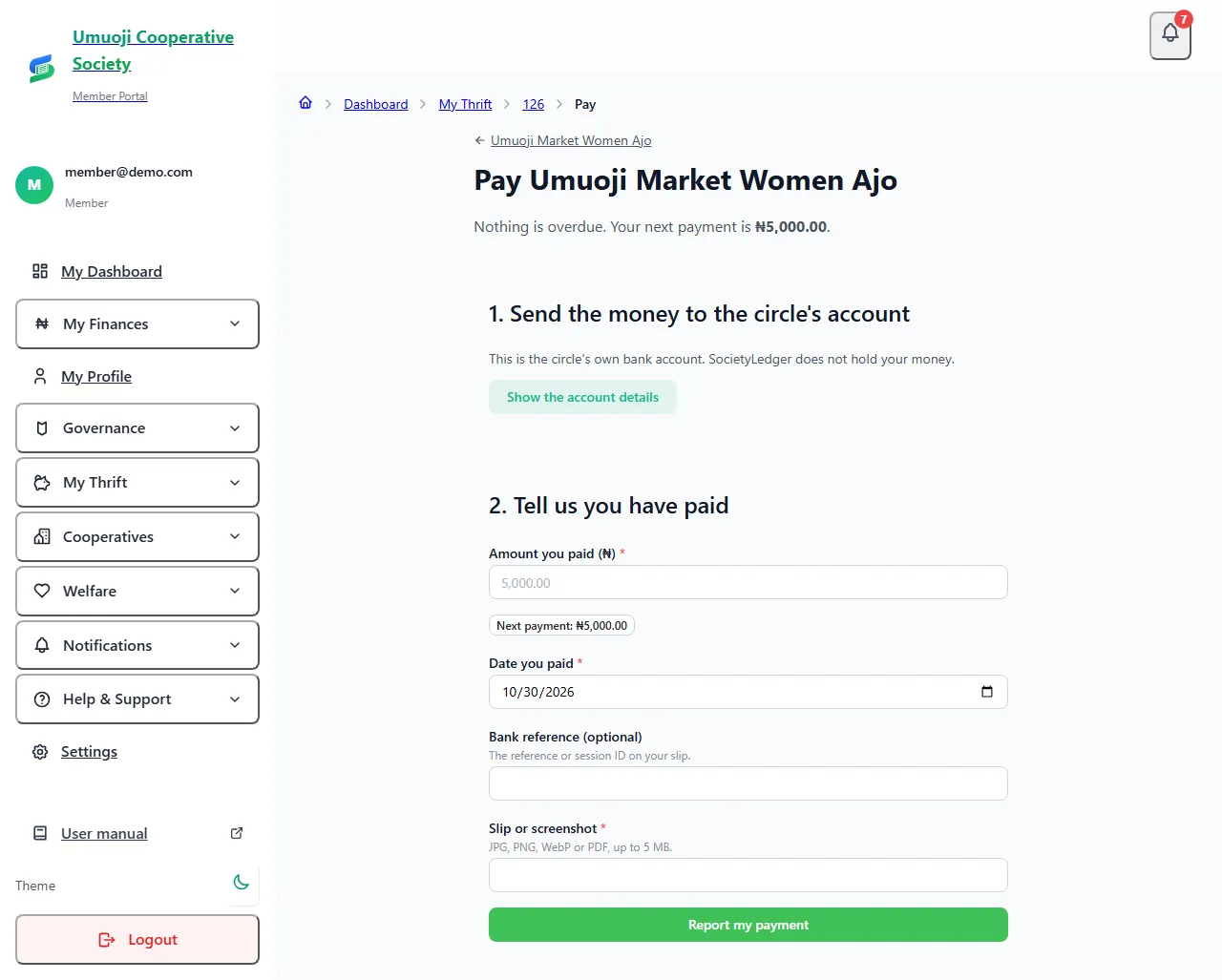
SocietyLedger never takes your money. You pay your circle's own bank account, then tell SocietyLedger that you have paid and attach your proof. An officer checks the bank statement and confirms it. When they do, you get a receipt.
Saving with a collector? Your collector records your cash, and you do not need to do anything here. See Your savings as a saver.
Before you start
- Your membership must be Running. If it is not, the page says "You can pay once the circle has approved you."
- Have your proof of payment: a screenshot of the transfer, or the bank's receipt. It can be a JPG, PNG, WebP or PDF, up to 5 MB.
- Have the amount you sent, the date, and, if your slip shows one, the bank reference or session ID.
Pay
Find it again
Open My Payments in the sidebar (on the phone: Thrift, then Pay and report a payment). For each of your circles it shows what is due, a Report a payment button, and every payment with where it stands: Reported, Confirmed or Turned down. Before your circle has started, or before you have been approved, the page says so instead of hiding the button: "Payments open when the circle starts on [date]".
If you paid and forgot to report it, an officer who has seen it at the bank can record it for you. It then shows as recorded by an officer from the bank.
What happens next
- Your payment is Reported. You will see "Reported." and it shows as Waiting to be confirmed. It is not counted as paid yet. See Payment statuses.
- An officer checks it against the circle's bank statement, usually within 48 hours. When they confirm it, it counts, and you get a receipt.
- If they turn it down, you see the reason. This can be because the money is not in the statement, or the slip does not match. Check with your bank, and report it again with the right slip.
- If they cannot find it, you can raise a query about the payment.
Pay before the due date. If you pay inside the grace period, your round shows Paid late, with no fee. If you pay after it, a late fee may apply if your circle's rules have one.
Good habits
- Pay only to the account shown on the Pay page. Never to an account someone gives you by message.
- Keep your slip until you have your receipt.
- Report as soon as you pay, so the officer sees it while the statement is fresh.
- Do not report the same payment twice. The same slip or reference used again is flagged to the officer.
Reported is not paid
If you do not see a receipt, your payment is not counted yet, even though you sent the money. Do not assume it is fine. Check your circle page after a day or two, and ask an officer if it is still waiting.
Related
Payment statuses
What Paid on time, Reported, Overdue, Missed and the other words mean in a circle, who decides them, and what counts as paid.
Raising a query about a payment
If you paid but it does not show, tell your circle with I already paid this, attach your evidence, and see how an officer decides it.
Staying safe in a circle
What SocietyLedger does and does not do with your money, and the habits that protect you, your savers and your circle.
Last updated 31 October 2026
Joining a circle and accepting the rules
What to do when a circle adds you: read and accept the rules, confirm your phone if asked, and see what you are waiting for.
Your payout account and verification
Add the bank account your circle pays you into, understand the SocietyLedger check, and what happens when you change the account.