

Your savings as a saver
If you save through a collector: see every naira you have given, where your cash is, what you will get back, and what to do at the end of the cycle.
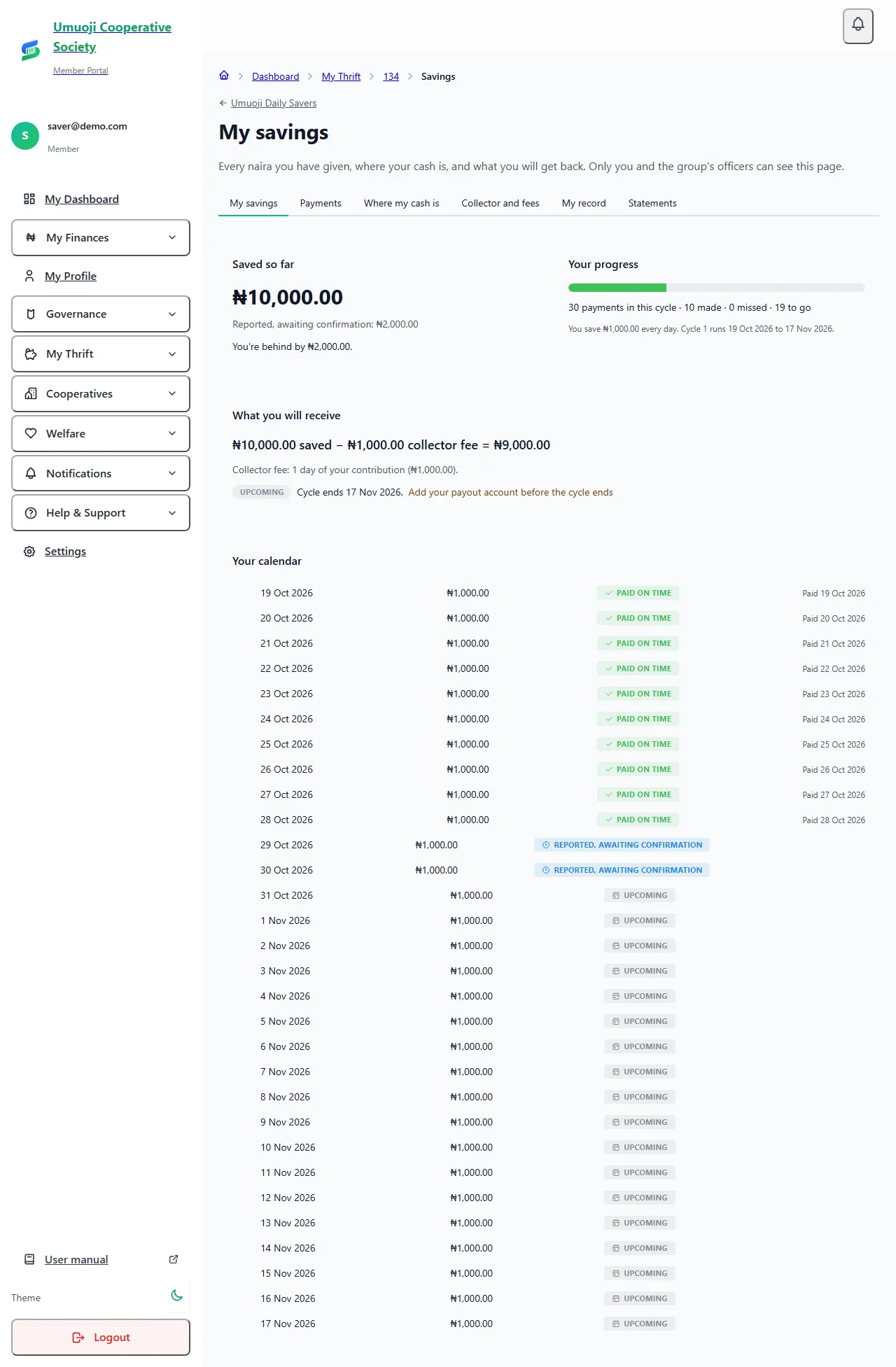
If you save with a collector, My savings is your page. It is private: only you and your circle's officers can see it. It answers three questions: how much have I given, where is my cash, and what will I get back.
Before you start
Your circle must have added you, and you must have accepted its rules. See Joining a circle and accepting the rules.
Open your savings
The tabs
My savings shows Saved so far (confirmed money only), your progress (for example "30 payments in this cycle · 10 made · 0 missed · 19 to go"), and what you will receive: your savings less the collector's fee. For example, ₦10,000.00 saved − ₦1,000.00 collector fee = ₦9,000.00. Under it is a calendar of every day, with its status. Money you have given that is not counted yet is shown as Reported, awaiting confirmation, and the page says "You're behind by ₦2,000.00" until the office counts it.
Payments lists every payment: the date, the amount, how you paid (for example Cash to collector), who recorded it, its status, and its receipt number. Confirmed payments have a Receipt you can open.
Where my cash is follows each cash payment through three steps: your collector recorded it, your collector handed it in, and the office confirmed it, with who and when. If a step takes too long (a day for your collector, two for the office), it says so, and you can ask about it. This is how you can always answer "did my money get there?".
Collector and fees shows your collector's name and phone, since when, your daily target and when they last took cash, and the fees and charges: the collector's fee and how it is worked out.
My record shows how many of your payments were on time ("10 of your last 11 payments were on time (91%)"), your streak, and your past cycles with their totals.
Statements lets you download your statement. See Your statement.
When the cycle ends
Three days before your cycle ends, you are asked: What would you like to do with your savings?
- Withdraw them: they are paid to your payout account.
- Continue into the next cycle: they stay in the group, and you choose What will you save each time next cycle?
Select Save my choice. If you do not answer, your savings are paid out to you. Once your payout has started, your choice can no longer change. If you will withdraw, make sure your payout account is added and verified before the cycle ends. The page reminds you if it is not.
If something looks wrong
If a payment you made is not shown, or a day shows as behind when you paid, use I already paid this next to that day on your circle page, or Ask about this payment on the Where my cash is tab, under a payment that is taking too long. See Raising a query about a payment.
Check the same day
Open Where my cash is after your collector visits. If your payment shows as recorded, you have proof that you paid. If it does not, tell an officer straight away, while you both remember.
Related
Payment statuses
What Paid on time, Reported, Overdue, Missed and the other words mean in a circle, who decides them, and what counts as paid.
Cash reconciliation
How cash a collector takes in becomes confirmed money: recorded, handed over, counted, then confirmed, and what happens when the count is short.
Your statement
Download your savings statement as a PDF or CSV, or a circle statement you can share in the group chat, and how anyone can check it is genuine.
Last updated 30 October 2026
Your payout account and verification
Add the bank account your circle pays you into, understand the SocietyLedger check, and what happens when you change the account.
Your trust score
How your on-time record in your circles becomes a score, what the bands mean, and what the score can and cannot affect.