

Officer accountability
See who prepared, approved and recorded every payout, how long payments wait to be confirmed, cash by collector and day, and every exception with its reason.
Officers hold other people's money records, so they answer to the circle. The accountability page puts the evidence in one place, for your own meetings and for anyone who audits you. Members of a rotating pot see how many payments are waiting and how long the oldest has waited. This page shows who each one is.
Before you start
You need to be an officer of the circle: manage, reconcile or approve payouts. Members cannot open this page.
Open it
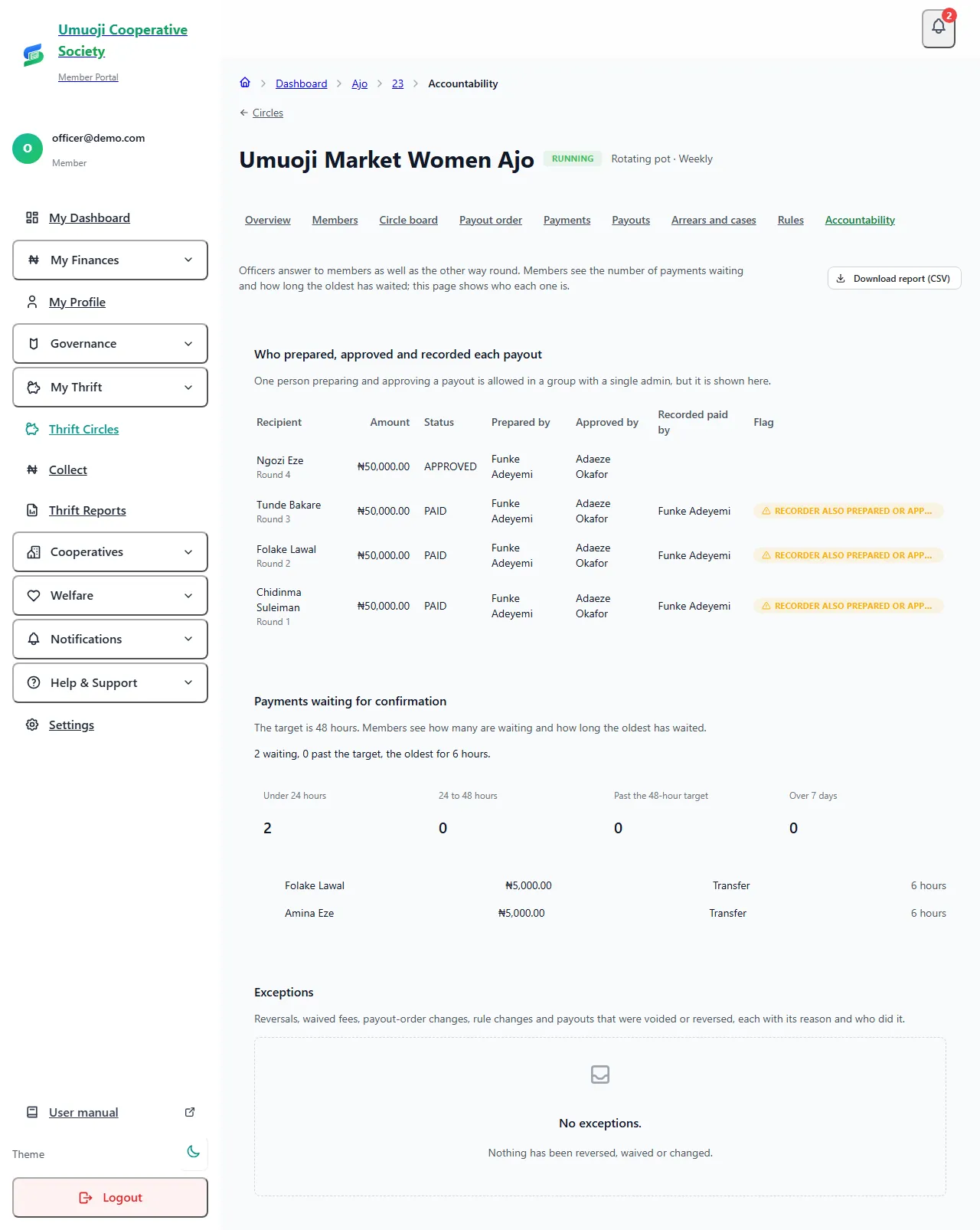
What the page shows
Who prepared, approved and recorded each payout. For every payout, three names: the person who prepared it, the person who approved it and the person who recorded it as paid. Two things are flagged:
- One person prepared and approved. This is allowed in a circle with a single admin, but only with an extra confirmation and a note, and it is always shown here.
- The recorder also prepared or approved it. Allowed, but shown, because the more people a payout passes through, the safer it is.
Payments waiting for confirmation. How many are waiting, how many have waited past the 48-hour target, and the oldest, in four age groups: under 24 hours, 24 to 48 hours, past the target, and over 7 days. Each waiting payment is listed with the member's full name, so you know who to chase.
Cash by collector and day (collector thrift only). For each collector and each day: what was expected, what they recorded, what they handed in, what the office counted, and any difference. See Cash reconciliation.
Exceptions. Everything that changed the record after the fact, newest first, each with who did it and the reason they gave: a payment reversed, a late fee waived, payout positions swapped or moved in an emergency, rules changed, and a payout cancelled or reversed after being recorded as paid.
Payments recorded by an officer
When an officer records a payment they have seen at the bank, it is confirmed in one step by the same person. These appear in the activity list as a self confirmation, with the officer's note, so an admin can review how many were done this way and check them against the bank statement.
Why a reason is always there
Reversing a payment, waiving a fee and moving someone in the payout order each need a written reason, and SocietyLedger will not save the change without one. Nothing is deleted. A mistake is corrected by a new entry that points at the one it cancels, so the original stays in the history.
The audit and activity report
Circles on the Business tier also have the Audit and activity report, which widens this into a record of everything: confirmations, reversals, payout steps, waivers, rule and order changes, default case steps, cash counts, and every time someone downloaded a report. It can be filtered by circle, dates and person, and downloaded as CSV or PDF. See Reports and exports.
What happens next
Use this page at your regular meeting. If the backlog is growing, add another person who can confirm payments. If one person keeps appearing as preparer, approver and recorder, bring in a second officer, so no payout depends on one person's honesty.
Related
Preparing, approving and recording a payout
How a payout is worked out, approved by a second person, paid from the circle's own account and recorded, and what to do if the transfer fails.
Confirming payments
Check a reported transfer against the bank statement and confirm it, turn it down, or reverse a payment that was entered by mistake.
Reports and exports
The eight Ajo reports: what each one counts, which tier includes it, and how to filter, read and download them as CSV or PDF.
Last updated 30 October 2026
Reports and exports
The eight Ajo reports: what each one counts, which tier includes it, and how to filter, read and download them as CSV or PDF.
Roles in a thrift group
The roles in a standalone thrift group (Administrator, Officer, Collector, Member), what each can do, and how to give someone a role on web and phone.